
Quantum computing for beginners often sounds like something from a science fiction film. Golden machines. Impossible maths. Headlines promising computers that solve everything overnight.
The truth is calmer, and honestly more interesting. This guide to quantum computing for beginners explains the idea in plain words, with no physics degree needed.
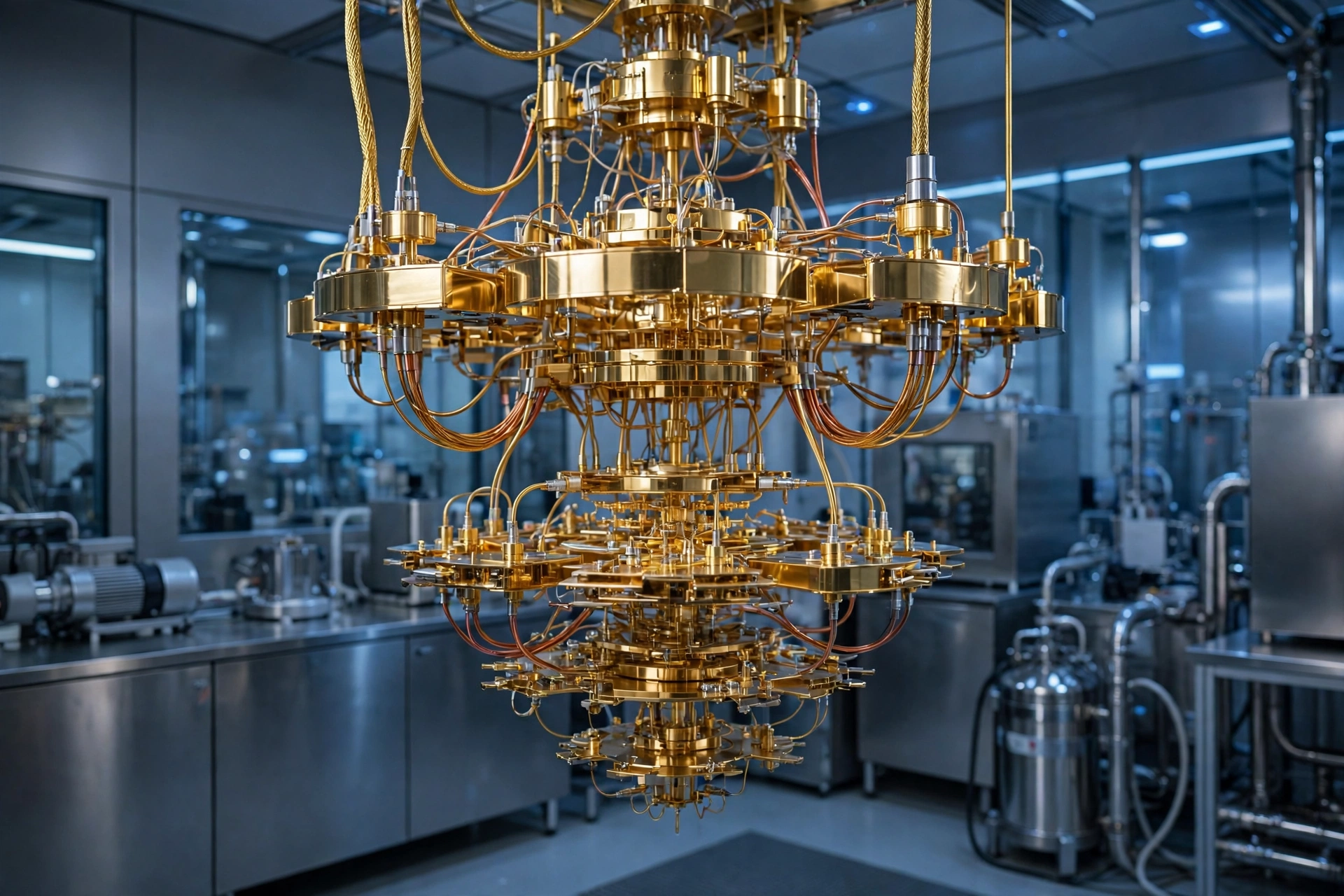
You will learn what a qubit is, why these machines are built like golden chandeliers, and what they can actually do today. You will also learn what they cannot do, because the hype around this topic is real.
Table of Contents
What Is Quantum Computing for Beginners in Simple Words?
Here is the short version. A normal computer stores information in bits. Each bit is either 0 or 1, like a light switch that is off or on.
A quantum computer stores information in qubits. A qubit can hold a mix of 0 and 1 at the same time, with different weights for each.
That one difference changes everything. It does not make the machine faster at everything. It makes the machine better at a small, special family of problems.
Think of it this way. A normal computer checks answers one by one, or in parallel batches. A quantum computer shapes the problem so wrong answers cancel each other out and the right answer stands out.
That is why quantum computing for beginners is best understood as a different kind of computing, not a faster version of your laptop. Your phone will not be replaced by one of these machines.
Bits vs Qubits: The One Idea to Remember
Let me use a simple picture. A bit is a coin lying flat on a table. Heads or tails. Nothing in between.
A qubit is more like a coin spinning in the air. While it spins, it is not heads and not tails. It is a blend, and the blend can lean toward one side.
When the coin lands, you get one clear result. Measuring a qubit works the same way. You get a plain 0 or 1, but the odds depend on the blend you set up.
Now add more qubits. Two bits can be in only one of four combinations at a time: 00, 01, 10, or 11. Two qubits can hold a blend of all four combinations at once.
Each extra qubit doubles the number of combinations in the blend. Ten qubits hold 1,024 combinations. Fifty qubits hold more than a quadrillion.
That growth is the heart of quantum computing for beginners. It is also why these machines are so hard to build and control.
Superposition: Holding a Blend
Superposition is the name for that blend. A qubit in superposition carries some weight for 0 and some weight for 1.
A common beginner mistake is to say the qubit “is both 0 and 1.” That sounds neat, but it misleads. The weights matter, and you cannot read all of them out at the end.
Entanglement: Qubits Linked Together
Entanglement links qubits so their results depend on each other. Measure one, and you learn something about the other, even if they sit apart.
This linking is what lets a group of qubits represent patterns that separate bits never could. Without entanglement, a quantum computer would lose most of its power.
Interference: Making Wrong Answers Cancel
Interference is the real engine. A quantum program nudges the weights so wrong answers cancel out and right answers grow stronger.
Picture ripples on water. Some ripples add up. Others flatten each other. A quantum algorithm arranges that same adding and cancelling on purpose.
When the machine is finally measured, the surviving answer is the likely one. That is the trick behind quantum computing for beginners, and it is cleverer than “trying everything at once.”
How a Quantum Computer Works, Step by Step
The process is shorter than most people expect. There are four main steps.
Step 1: Prepare the Qubits
The machine first sets its qubits to a known starting state, usually all zeros. This is like clearing a desk before you start work.
Step 2: Apply Quantum Gates
Next, the machine applies gates. A gate is a small, precise operation that changes the blend of a qubit or links two qubits together.
Gates are the instructions of a quantum program. A full set of gates in order is called a circuit.
Step 3: Let Interference Do the Work
As the gates run, interference shifts the weights. Wrong answers fade. The right answer becomes more likely.
Step 4: Measure and Repeat
Finally, the machine measures the qubits and gives one ordinary answer made of 0s and 1s.
One run gives one sample, not a guarantee. So the same circuit usually runs hundreds or thousands of times, and the results are counted. The most common answer is the one you trust.
That repeat-and-count habit surprises many readers of quantum computing for beginners guides. It is normal. The machine deals in odds, and statistics turn those odds into an answer.
Quantum Computing vs Classical Computing
The two machines are partners, not rivals. Each wins at different jobs.
| Feature | Classical computer | Quantum computer |
|---|---|---|
| Basic unit | Bit (0 or 1) | Qubit (weighted blend) |
| Best at | Everyday tasks, apps, browsing | Simulating molecules, certain maths problems |
| Output | One exact answer | Probabilities, counted over many runs |
| Runs at | Room temperature | Near absolute zero for many designs |
| Replaces your laptop? | It is your laptop | No |
A classical computer will beat a quantum computer at opening your email, editing a photo, or running a spreadsheet. It is not close.
A quantum computer may beat a classical one at modelling how a molecule behaves. That is a narrow win, but a valuable one for chemistry and materials.
This honest split is what quantum computing for beginners should teach first. Anyone promising a quantum laptop for home use is selling something.
What Quantum Computers Are Good At
In quantum computing for beginners, three areas stand out today.
First, simulating nature. Molecules and materials follow quantum rules, so a quantum machine can model them in a way classical machines struggle with. This could help design better batteries, medicines, and fertilisers.
Second, certain maths problems. Factoring large numbers is the famous example. A large, reliable quantum computer could factor numbers that would take classical machines an absurdly long time.
Third, some optimisation and search problems. These gains are smaller and less certain, so treat big claims with care.
Notice the pattern. The wins are specific. Quantum computing for beginners is a specialist tool, a bit like a microscope. A microscope is useless for hammering nails, and nobody minds.
What Quantum Computers Cannot Do Well
Let me clear up three myths I see again and again.
Myth one: a quantum computer tries every answer at once and picks the best. Not quite. It uses interference so wrong answers cancel. If it simply tried everything, you still could not read all the answers out.
Myth two: quantum computers will make all encryption useless tomorrow. A big enough machine could break some current encryption, which is why experts are already moving to quantum-safe methods. Today’s machines are far too small and error-prone for that job.
Myth three: more qubits always means a better machine. Qubit quality matters as much as count. A hundred noisy qubits can be less useful than fifty clean ones.
Keeping these limits in mind makes quantum computing for beginners far less confusing. In quantum computing for beginners, the field is real, progress is real, and so are the limits.

Why Quantum Computers Look Like Golden Chandeliers
Photos of quantum computers show a golden, chandelier-like structure hanging inside a large cylinder. That structure is mostly cooling and wiring.
Many qubit designs must sit near absolute zero, colder than deep space. Heat and vibration knock qubits out of their delicate state. Scientists call that loss decoherence.
Errors are the biggest challenge in the field. Qubits are fragile, and every operation carries a small chance of going wrong.
The long-term fix is quantum error correction, which spreads one reliable qubit across many physical ones. It works in principle. It also needs a lot of qubits, which is why progress takes time.
When you read about quantum computing for beginners, remember that the golden chandelier is a refrigerator with a chip at the bottom. The chip is small. The cooling around it is not.
How to Start Learning Quantum Computing for Beginners
You do not need a physics degree to start. You do need patience and a little basic maths.
Step 1: Learn the Core Ideas First
In quantum computing for beginners, start with bits, qubits, superposition, entanglement, and interference. If you can explain those five ideas to a friend, you have a solid base.
Step 2: Refresh Basic Maths
A little probability and simple linear algebra go a long way. You do not need advanced calculus on day one.
Step 3: Try a Free Online Simulator
Several companies offer free tools where you can build small circuits in your browser and run them on a simulator or real hardware. For quantum computing for beginners, running a two-qubit circuit teaches more than an hour of theory.
Step 4: Build Small Projects
Try simple circuits, then look at famous algorithms like Grover’s search. Small wins keep motivation alive.
If coding itself is new to you, start there first. Our guide to web development for beginners covers the basics in the same plain style.
For a deeper technical walkthrough, the Baeldung introduction to quantum computing is a solid next read.
A steady path like this is the practical side of quantum computing for beginners. Thirty minutes a day beats one long, confused weekend.
Common Mistakes Beginners Make
The first mistake is skipping the basics and jumping straight to famous algorithms. The algorithms will not make sense without superposition and interference.
The second mistake is treating a qubit as a faster bit. It is a different thing entirely, and that mindset leads to wrong expectations.
The third mistake is believing every headline. Check whether a result ran on real hardware, how many qubits it used, and whether other teams confirmed it.
The fourth mistake is giving up at the maths. Start with the ideas, add maths slowly, and use simulators to see results.
Avoid those four traps and quantum computing for beginners becomes a topic you can genuinely enjoy, not just admire from a distance.

Frequently Asked Questions
Is quantum computing hard to learn?
In quantum computing for beginners, the basic ideas are learnable in a few weeks of steady study. The deep maths takes longer, but you can build small circuits early and grow from there.
Will quantum computers replace normal computers?
No. They are specialist machines for specific problems. Normal computers will keep handling everyday work, and the two will likely work together.
What is a qubit in simple words?
A qubit is the basic unit of quantum information. Unlike a bit, it can hold a weighted blend of 0 and 1 until it is measured.
Do I need to know physics to start?
Not much. Basic probability helps more at the start. Physics becomes useful later if you want to understand the hardware.
Can I try a quantum computer for free?
Yes. Free online tools let you build circuits and run them on simulators, and some offer limited access to real quantum hardware.
Disclaimer
This article is general educational information about quantum computing for beginners, not professional, technical, or financial advice. Details such as company claims, machine capabilities, and timelines change quickly, so readers should verify important facts from official sources before relying on them.
To learn more about the site behind this guide, visit the About Us page.